
Shopify live view for videos, from a dashboard of our own
Updated · By Larpea
A Shopify live view, for a video, is the store screen that shows visitors right now, active carts, checkouts and new orders as they happen. Shopiflex draws one under your store name, in a design of our own with no Shopify logo. It is free to try, then $29, cancel anytime. It includes a rotating globe.
Opens in your browser, no account. Full version $29 a month, cancel anytime. What the full version adds
Not affiliated with Shopify. Original design, no Shopify logo or trademark.
Part of the fake dashboard generator hub.
What people film when they search for a Shopify live view
The live view of an online store is the screen an owner keeps open on launch day: who is browsing right now, who has something in a cart, who is on the checkout page, and the orders that follow. In a video it is the shot that makes a launch feel alive. Searches for a Shopify live view dashboard are about that screen. Black Friday falls on Friday 27 November in 2026 and Cyber Monday on 30 November: the dates a sale-countdown video is made for.
Shopiflex has a live view of its own design, under your store name: no Shopify name, logo or layout, and no store connected. Every visitor, cart and order on it is a number you set or a simulation drawn from the targets you set.
The live view, piece by piece
| On screen | What it shows | Film it for |
|---|---|---|
| Visitors right now | One big count with a pulse, today's sessions under it, and a 30-minute strip of bars. | The opening shot: the store is busy. |
| From visit to order | Four steps: visitors browsing, active carts, checking out, purchased in the last 30 minutes. | The funnel narrowing as orders land. |
| Live activity | A feed of product views, items added to carts, checkouts started and new orders, each with a country code. | The scrolling feed behind a voice-over. |
| Live globe | A rotating 3D-style globe with the visitor count, total sales, sessions and orders over it. Each new order lights an arc from the customer's city to your store. | The hero shot: orders flying in from around the world. |
| Sales today | The day's total, the order count and the average per order. | The number that climbs. |
| Sessions by location | The top five countries as two-letter codes with bars, drawn from a pool of 24 countries. | Where the traffic comes from, as a ranked list next to the globe. |
It follows the targets you set, with a fixed seed, so a setup replays identically: the same take on Friday as the rehearsal on Tuesday.
The store around it
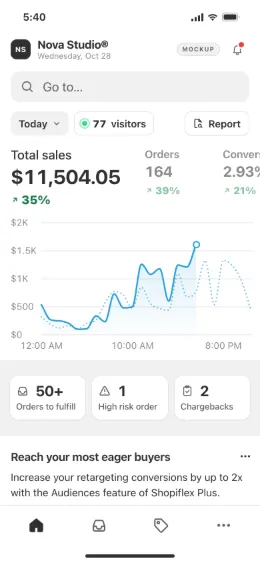
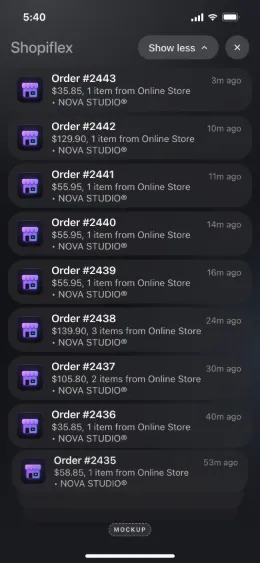
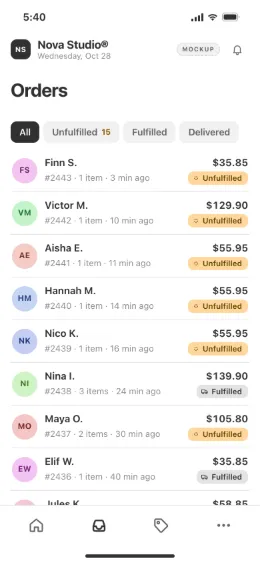
Shopify live view globe and map: what Shopiflex draws
Shopiflex now has a globe of its own. At the top of the live view, a dark rotating Earth is drawn in dots on a canvas, with a soft glow around it and no map tiles or outside files. Drag it to spin it. Each simulated order fires a pulse of light along an arc from a plausible city in the customer's country to your store, in step with the order feed and the counters under it. Visitors right now, total sales, sessions and orders sit over the globe, and it stays in the free version, with the mockup label on. It slows to a still image if the viewer's device asks for reduced motion.
It is a drawing of ours, not a copy of anyone's. It is also still a simulation: the cities are picked from a list per country and the orders come from your targets, so it shows no real shopper and no real sale. The location card next to it stays a ranked list of country codes with bars.
The Black Friday globe people search for is Shopify's own public page. Its 2025 edition, titled “Shopify Live Globe 2025” and described as real-time global shopping stats for Black Friday Cyber Monday, is at bfcm.shopify.com (checked Nov 2026). It is a page of worldwide figures published by Shopify, not an admin screen of one store, so it is not what Shopiflex imitates and not something to recreate.
Film a launch-day live view in six steps
- Name the store and add its products. Store name, logo, product photos and prices are yours. The product views and carts in the live feed are drawn from that list.
- Set the day's targets. Sessions and sales for the day drive the visitor count, the carts and the country shares. Start the day at zero if you want the first-order moment on camera.
- Make the live view the opening screen. In the editor, set the screen it opens on to Live view. On a phone layout it is the Live tab in the bottom bar.
- Pick laptop or phone. Laptop for a screen recording of a desktop browser, phone for a vertical video. The preview next to the editor shows both.
- Present, then start live mode. Full screen hides the editor. Space starts or pauses live mode and N lands an order on cue, so a Black Friday countdown can end on a sale.
- Record in one take. The free version runs live mode for 2 minutes per visit, long enough for a short reel. A longer take needs the full version.
For a two-screen Black Friday scene, put the lock screen from fake Shopify notifications on the phone and this live view on the laptop. Both are free to try, then $29 for Shopiflex.
What it is never for
A live view filmed with Shopiflex shows no real visitor and no real sale. Showing it as the traffic or revenue of a real store, to sell a course, a store or a mentorship, is a deceptive earnings claim, and our terms forbid it. If you are checking someone else's claim, read spotting faked sales results; for the legal side, is larping illegal in the US.
More from the same hub: the fake Shopify dashboard, the fake sales dashboard and the full fake dashboard generator list.
Ready for launch day? Shopiflex opens in your browser; name the store and let the live view fill up.
Try Shopiflex free, no cardOpens in your browser, no account. Full version $29 a month, cancel anytime. What the full version adds