
Fake Shopify dashboard for videos, in a design of our own
Updated · By Larpea
A fake Shopify dashboard is a store admin you film instead of a real one: a big sales total, orders landing, visitors and conversion. Shopiflex builds one in a design of our own, under your store name, with no Shopify name or logo. It is free to try in the browser, then $29, cancel anytime.
Opens in your browser, no account. Full version $29 a month, cancel anytime. What the full version adds
Not affiliated with Shopify. Original design, no Shopify logo or trademark.
Part of the fake dashboard generator hub.
What people want from a fake Shopify dashboard
The searches are many: a fake Shopify dashboard website, generator, app, maker, a free one, a fake Shopify store dashboard, a fake ecommerce dashboard. They all want the same screen, a store admin with a big sales total, orders coming in and visitors browsing, to film for a launch skit, a pitch demo, a reel about building a store or a film set.
Shopiflex is that screen as a web page you open: our own design, under your store name, with orders that keep landing while you record. It is not an image generator. You record the screen, and take a frame from your recording if you need a still.
What it looks like
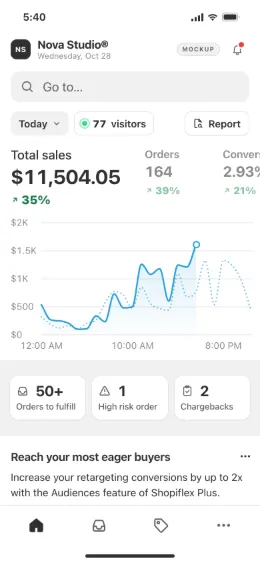
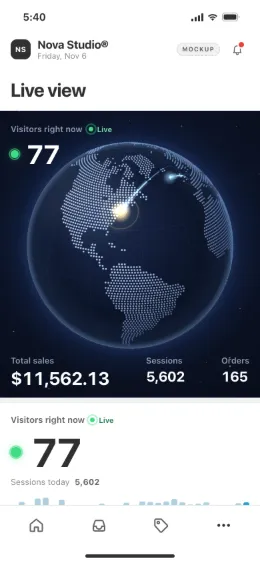
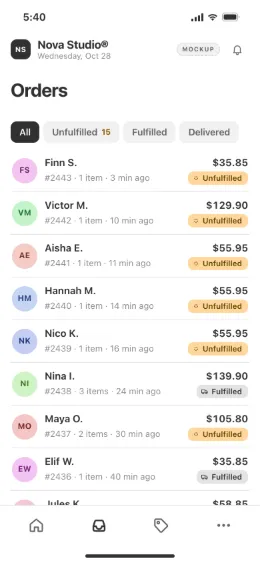
Set up a fake Shopify dashboard in six steps
- Give the store its name and logo. They are the only brand on screen. Do not type a real platform's name: our terms forbid recreating one.
- Add the products. Names, photos and prices. Orders, top products and stock are drawn from this list, and the stock goes down as live orders land.
- Set the numbers you want. Targets for the day drive the sales total, sessions, conversion rate and average order value.
- Choose the look. Light or dark, an accent colour, and the screen it opens on: Home, Orders, Products, Live view or the lock screen.
- Pick the layout. A rail layout for a laptop screen recording, bottom tabs for a vertical video.
- Present and go live. Space starts or pauses live mode, N lands an order on cue, F fulfils the oldest open order, 1 to 5 switch the range, Esc returns to the editor.
Fake Shopify dashboard generator or app: seven checks
Whatever tool you choose, run it against this list. The right column is what Shopiflex does, read from the app itself.
| Check | Why it matters | Shopiflex |
|---|---|---|
| No platform brand | Your video should carry your store's brand only, and a copied layout can get a clip taken down. | Own design; no Shopify name, logo or layout. |
| A label that says mockup | Viewers and platforms should be able to tell. | On by default, always on in the free version. |
| It moves | A still total looks dead on camera. | Orders land every few seconds, in little bursts. |
| The same take twice | Retakes need the same numbers. | A fixed seed replays the same setup identically. |
| Phone and laptop | Vertical video and screen recording are different shots. | Both layouts, installable and usable offline. |
| No documents | A generator that exports invoices or receipts is a forgery tool. | No export of orders, invoices, receipts or packing slips, only your settings as JSON. |
| No account needed | You can test before you pay. | The free version needs no account. |
A free fake Shopify dashboard, and what the full version adds
| Feature | Free | Full, $29 |
|---|---|---|
| Store name, logo, products, theme | Included | Included |
| Today range | Included | Included |
| Yesterday, 7, 30 and 90 days | Locked | Included |
| Live mode | 2 minutes per visit | As long as you film |
| Orders, live view, both layouts, presentation | Included | Included |
| Mockup label | Always on | On by default, your call |
The free version needs no account and gives you the whole store admin on the Today range. The full version unlocks the longer ranges and removes the 2-minute limit on live mode for $29, cancel anytime, with a refund within 14 days.
What a fake Shopify dashboard must never become
Shopiflex reads no store and moves no money. A simulated order is not revenue, and a fake Shopify sales dashboard shown as real results to sell a course, a store or a business opportunity is a deceptive earnings claim in the US and against our terms. If you are the one being shown such a screen, spotting faked sales results lists what to ask for.
Related scenes from the same hub: a Shopify live view for videos, a fake sales dashboard and fake Shopify notifications, plus the full fake dashboard generator list.
Ready to film the store? Shopiflex opens in your browser; your store name, your products, your numbers.
Try Shopiflex free, no cardOpens in your browser, no account. Full version $29 a month, cancel anytime. What the full version adds