
Fake YouTube earnings dashboard, for the skit
Updated · By Larpea
A fake YouTube earnings dashboard is a channel revenue screen you can film: monthly earnings, views and subscribers you set, climbing while the camera rolls. LarpTube Studio draws it in a design of our own, for a channel you name. It is free to try, then $14. It reads no channel and is never a record of real income.
Opens in your browser, no account. Full version $14 a month, cancel anytime. What the full version adds
Not affiliated with YouTube. Original design, no YouTube logo or trademark.
Part of the fake dashboard generator hub.
The earnings screen people search for
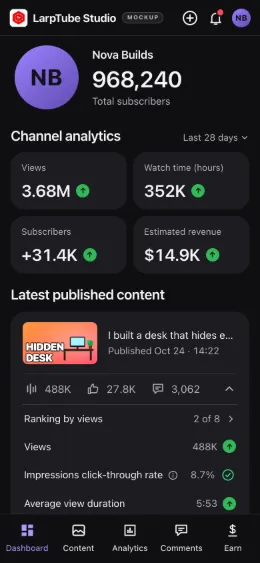
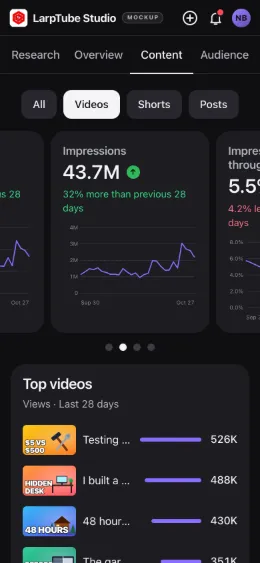
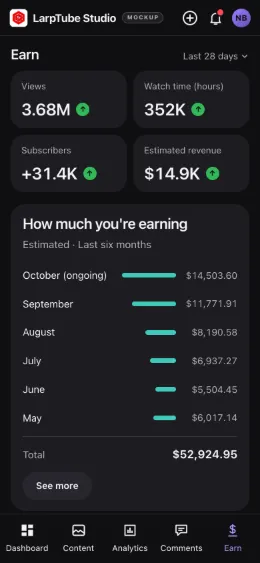
A fake YouTube earnings dashboard, in a skit, is the moment a creator opens the revenue tab and the month comes up bigger than expected: estimated revenue, revenue per thousand views, the bars climbing month after month. LarpTube Studio draws that screen, and the channel stats around it, in a dashboard of our own design. You name the channel and set every number; nothing is read from YouTube or from any account.
The details that sell the shot are the small ones: thumbnails that match the channel's style, video titles in its voice, a revenue curve with a believable dip in the middle of the year. LarpTube Studio lets you set each of them, and keeps the setup in your browser, so you can come back for a second take with the same numbers.
It is the same app as the fake YouTube Studio page describes, seen from one tab: here, the revenue view and the month-by-month earnings chart, which the full version extends to the last 12 months.
The revenue and channel screens
Set it up and record it
- Name the channel. Type a channel name and add your own video titles and thumbnails; pictures are resized on your device and never uploaded.
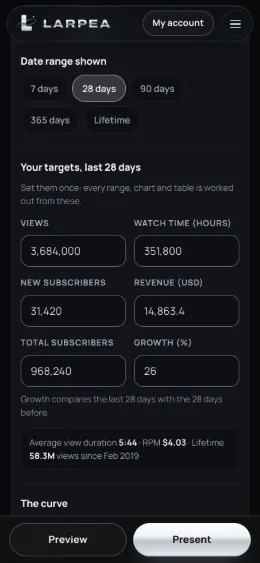
- Set the targets once. Views, watch time, subscribers and revenue for the range you show, plus the growth. The curves are drawn from those targets and a seed, so the same setup replays the same charts.
- Choose the range. The free version shows the last 7 days. The full version adds 28, 90 and 365 days, lifetime, and monthly revenue for the last 12 months, the screen most earnings scenes need.
- Press Present. The dashboard opens alone, full screen. On a computer, F toggles full screen and M plays the milestone animation; E brings the editor back.
- Record the screen, then cut to your reaction. Use the computer's screen recorder, or film the screen with a phone on a tripod for a more natural shot. The real-time views for the last 48 hours keep ticking while you roll.
Fake YouTube analytics and fake YouTube Studio
The same app draws the screens people call “fake YouTube analytics” and “fake YouTube Studio”: views, watch time and subscribers you set, climbing while you film. It reads no real channel and is never a record of income. The full fake YouTube Studio dashboard page covers the whole app.
Where the joke ends
A channel's earnings screen is exactly what a sponsor, a brand or a course buyer may rely on. Shown to them as real, a typed-in revenue figure misrepresents your reach and income; in the US, the FTC's rule on reviews and testimonials (16 CFR Part 465) also covers fake indicators of social media influence. Use it for skits, parodies, explainers about how creators get paid, and film props, with the mockup label on when there is any doubt. Our terms forbid the rest.
For a short-video profile instead of a long-form channel, see the fake TikTok follower count; for a creator subscriptions screen, the non-adult creator earnings template.
Ready for the revenue reveal? LarpTube Studio opens in your browser; name the channel and set the month's numbers.
Try LarpTube Studio free, no cardOpens in your browser, no account. Full version $14 a month, cancel anytime. What the full version adds