
Larp Revolut: a neobank app mockup, made to be filmed
Updated · By Larpea
A larp Revolut is a staged shot of a neobank app: a big balance, cards and spending on a phone, filmed for a skit or a reel. Revolarp draws one for a fictional bank of our own design, with no Revolut name or logo. It is free to try, then $19. It is a prop and never proof of funds.
Opens in your browser, no account. Full version $19 a month, cancel anytime. What the full version adds
Not affiliated with Revolut. Original design, no Revolut logo or trademark.
Part of the fake dashboard generator hub.
What a larp Revolut is
“Larp Revolut” is slang for one short shot: a phone in hand, a neobank app opening on a big balance, a few taps through cards and spending, and a reaction. The point is the scene, not a bank. People type “Revolut larp” or “Revolut larp app” when they want that screen to film, and they usually want it without a real bank behind it.
Revolarp is that screen: a neobank app mockup for a bank we made up, in a design of our own. It follows the common layout of banking apps, a big balance, quick actions and a list of latest moves, and it resembles no real bank. It holds no money, connects to no bank and cannot send or receive anything.
Revolut larp app: what the mockup has, criterion by criterion
| What a Revolut-style scene needs | What Revolarp gives you | Free version |
|---|---|---|
| A believable balance | A total of your accounts and pots, with interest that ticks up by the second or a cashback that counts up when you tap it. | Yes |
| Accounts and pots | Everyday, savings, joint or business accounts, and pots with a goal, an icon, a colour and a progress ring. | 1 account, 1 pot |
| Cards | A swipeable carousel of six original designs, debit or virtual, with a freeze switch. Numbers hidden: only four digits you type. | 1 card |
| Spending that adds up | The month by category in a donut and a bar for every day, computed from your transactions. | Yes |
| Activity and search | Transactions grouped by day with original category icons, pending or done, and a search across merchants, categories and pots. | 10 most recent |
| A move that goes nowhere | Move money between your own accounts and pots with a keypad. It ends on a neutral Simulation screen: no tick, no confirmation. | Yes |
| Style and currency | A choice of display styles and wallpapers or your own image, light or dark, and amounts in dollars, euros or pounds. | Yes |
| A real bank's name or logo | None. The bank is fictional and its name cannot be changed. | Not available |
| Mockup label | On every screen by default. The free version cannot hide it; the full version can. | Always on |
The full version, $19 and cancel anytime, raises the limits to up to 8 accounts, 12 pots, 8 cards and 300 transactions, adds the home-screen app, and lets you choose whether the Mockup label shows.
The screens, as they ship
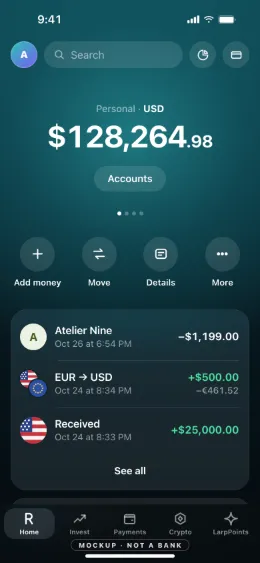
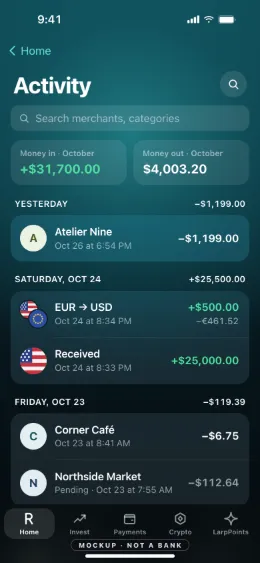
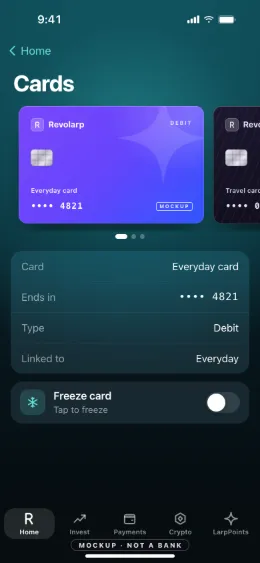
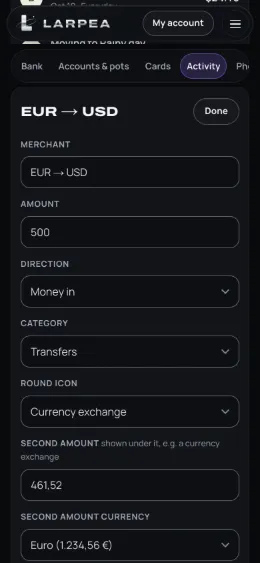
Film a larp Revolut scene in six steps
- Pick the look. Choose a display style, light or dark, a wallpaper, and the currency: US dollars, euros or pounds. The bank itself keeps its own name, Revolarp; it cannot be renamed.
- Set the balance. Type the balances of your accounts and the goal of each pot. The big number on the home screen is the total of both, and it is a number you chose.
- Type the month. Merchants, amounts, categories and dates. The spending view adds them up by itself, as a donut by category and a bar for every day.
- Choose the cards. Swipe through the carousel of original designs. Only four digits you type are ever shown, and the rest is dots.
- Open phone mode. Full screen, with the clock, battery and wallpaper the scene needs. The Mockup label sits at the bottom of every screen.
- Film the beat. Tap the balance for the cashback count-up, press the stats button, or freeze a card with its switch. Cut before anyone could mistake it for a real account.
Revolut-style, not Revolut
Revolarp uses no Revolut name, logo, colour or screen. It is a different bank in a different design, which is the point: a scene with a real brand's identity on it is a copy, and a copy is the first thing a viewer, a platform or a lawyer would question. Pick your own accent, keep the bank's own name on screen, and say in the caption that it is a prop.
What it is never for
A filmed neobank screen is a prop. It shows no account number, sort code or IBAN, and it makes no statements, receipts or transfer confirmations, so there is nothing in it that could prove funds, income or a payment. Our terms forbid showing it to anyone as such. If someone sends you a bank screen as proof of money, how to spot a fake bank statement and how to spot a fake bank balance screenshot give the checks, and fake bank statement consequences sets out what the law says about using one that way.
For the long guide to filming a bank scene, see bank app mockups. Cards on their own are on the larp card page, and the tap to pay is on larp Apple Pay. The whole list is in the fake dashboard generator hub.
Ready to film the bank screen? Revolarp opens in your browser with a bank we made up; the names, cards and spending are yours to type.
Try Revolarp free, no cardOpens in your browser, no account. Full version $19 a month, cancel anytime. What the full version adds