
Fake trading screen for videos: a free terminal that moves
Updated · By Larpea
A fake trading screen is a market terminal that moves on camera without touching a real market. Flexiom draws one, full screen, for a coin you invent: candles, a trades tape and holders that never stop, and keys to pump or dump the chart. It is free to try, then $9. No exchange, wallet or real order is involved.
Opens in your browser, no account. Full version $9 a month, cancel anytime. What the full version adds
Part of the fake dashboard generator hub. Original design, no exchange's name or logo.
A trading screen for the shot, not for trading
The fake trading screen in most videos is a background: a monitor behind the creator with candles moving, a tape of trades scrolling, a green number. Static images look dead on camera and real charts belong to real markets. Flexiom is a full-screen memecoin terminal of our own design where everything moves on its own, for a coin you invent, and where you decide when the chart pumps or dumps.
For a monitor in the background of a shot, record the terminal on the computer itself rather than filming the screen: you avoid the lines and flicker a camera picks up on a display, and you can lay the recording onto the monitor in the edit. If you do film the screen, lower its brightness and match the camera's shutter to the display.
It is made for desktop recordings first, with a phone layout too. Searches for a fake crypto chart, a fake trading screen for PC or a trading screen prank all want this same moving terminal; none of them needs a real exchange account, and Flexiom has none.
The terminal, in motion
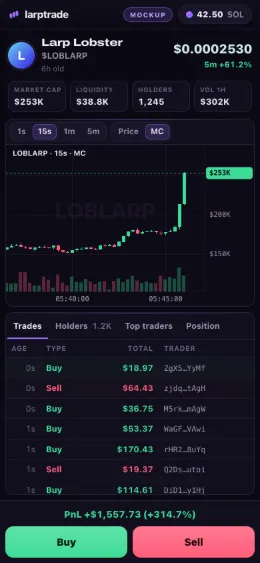
Record it in six steps
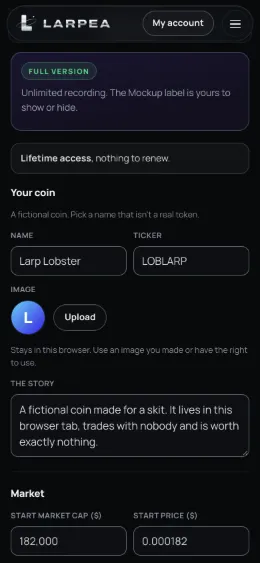
- Name a coin that does not exist. Name, ticker, image and story are yours. Pick a name that is not a real token's, and an image you made.
- Set its market. Supply, market cap and the mood of the chart. Candles, the trades tape and the holders are then generated in your browser.
- Open the recording view. At 1920 × 1080, 1440 × 900 or the size of your window, then press F for full screen.
- Start your screen recorder. Any recorder works. On a phone, add the page to the home screen for the phone layout with its Buy and Sell bar.
- Direct the chart. P pumps, D dumps, B buys the amount in the order panel and S sells everything. On a phone, double-tap the chart to pump and the price to dump.
- Leave with Esc. Esc takes you back to the editor. The free version stops a take after 2 minutes; the full version, $9, has no limit.
What the screen never claims
No exchange, wallet or blockchain is involved, and no order is ever real: trades, balances and profits exist on screen only, until you close the tab. A clip of it is fine as a skit, a meme or a demo. Presenting it as real trading, or using it to sell signals, a course or copy trading, is a false performance claim, outside our terms and often outside the law. For practising with real market data, a paper-trading account is the honest tool; memecoin paper trading on mylarpwallet.com explains the difference.
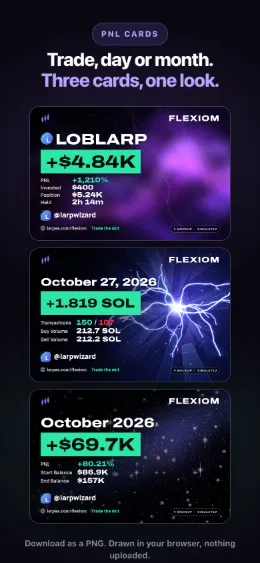
Want the result card instead of the terminal? See fake Axiom PnL cards. The two-screen version of a launch day, phone and laptop, is on fake Shopify notifications.
Ready to roll the terminal? Flexiom opens in your browser; invent a coin and press P to pump the chart.
Try Flexiom free, no cardOpens in your browser, no account. Full version $9 a month, cancel anytime. What the full version adds