
Larp card: 16 original card mockups to film
Updated · By Larpea
A larp card is a premium-looking card mockup that you film, not a real card. My Larp Cards is a card wallet simulator with 16 original finishes, a wallet stack, your own spending and a tap to pay on camera. It carries no bank logo, no Apple mark and no usable number. It is free to try, then $14.
Opens in your browser, no account. Full version $29 a month, cancel anytime. What the full version adds
Not affiliated with Apple, Apple Wallet or Apple Pay. Original design, no Apple logo or trademark.
Part of the fake dashboard generator hub.
What a larp card is
A “larp card” is the premium card people flash on camera: a black metal or holographic card at the front of a stack, a few expensive-looking purchases, a tap. The card is the prop. People search “larp card”, “larp card wallet” or “card wallet simulator” when they want that object on a phone screen without any real card behind it. The phrase also turns up in the role-playing hobby, where cards can be game pieces; this page is about the card mockup.
My Larp Cards is a card wallet simulator for exactly that. You design the cards, type the issuer name and the last four digits, set the spending, and film the phone. Every card is an original design of ours. None carries a bank logo, a card-network mark from the real world or a number you could pay with.
Larp card wallet: what a card needs to film well
| What makes a larp card film well | What My Larp Cards gives you | Free version |
|---|---|---|
| Card designs | 22 original finishes in fintech, metal, glass and holographic looks, drawn for Larpea. | 5 finishes |
| Bank and network marks | None from the real world. The six network marks are abstract shapes of our own: Prism, Hexa, Strata, Kite, Spark and Horizon. | Yes |
| The card number | Only the last four digits, which you type. Everything else is dots. | Yes |
| A wallet stack | Cards layered like a phone wallet: tap to bring one forward, hold and drag to reorder. | 2 cards |
| Card detail | Balance or available credit, a rewards line, and the latest transactions with merchant, amount, date and status. | Yes |
| Tap to pay | A face scan, a hold-near-reader ring and a check mark. An animation on your own screen: no terminal is contacted. | Yes |
| The phone around it | Status bar time, battery, signal, twelve wallpapers, a colour or your own image, light or dark, and amounts in dollars, euros or pounds. | Yes |
| Your setup | Kept in your browser. Export it to a file, import it on another device, or move it with a setup code. | Yes |
| Mockup label | On the screen by default. The free version cannot hide it; the full version can. | Always on |
The full version, $29 and cancel anytime, removes the card limit, opens all 22 finishes, adds the home-screen app, and lets you choose whether the mockup label shows.
Twenty-two finishes, five of them free
| Version | Finishes |
|---|---|
| Free, 5 | Midnight, Carbon, Plain colour, Script green, Graphite |
| Full, 17 more | Business white, Watercolour, Magenta fade, Electric blue, Black metal, Brushed titanium, Gold, Rose gold, Holographic, Pearl, Frosted glass, Emerald, Sunset, Deep ocean, Lavender, Ruby, Arctic white |
Pick one hero card and keep the others quieter: a black metal card in front of two dark ones reads as a wallet, a stack of loud finishes reads as a toy shelf.
The cards, as they ship
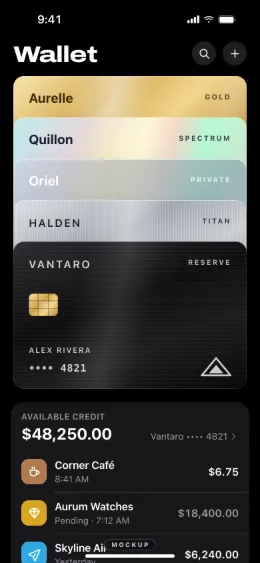
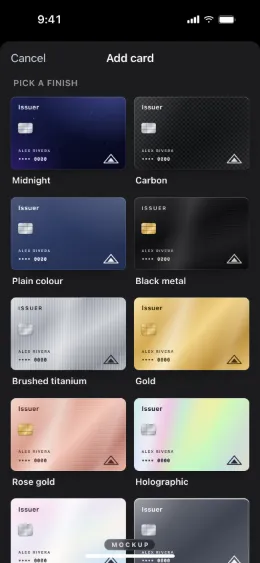
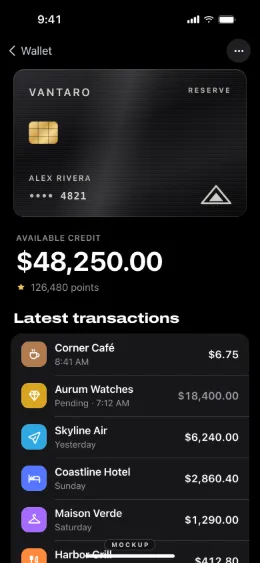
Make a larp card in six steps
- Add a card. Press + in the stack. The free version holds 2 cards; the full version has no limit.
- Pick the finish. Midnight, Carbon, Plain colour, Script green and Graphite are free. The other seventeen, from Business white to Frosted glass, come with the full version.
- Name an issuer of your own. The issuer name is free text and the card holder is yours. Type a made-up bank or your own brand, never a real one.
- Set the last four digits. They are the only digits that exist. The rest of the number is dots and never exists anywhere.
- Add the spending. Merchants, amounts, dates and a status, pending or done, so the card feels lived in when you open it.
- Stack, open and film. Tap a card to bring it forward, tap again to open it, hold and drag to reorder. Film the phone in phone mode.
Larp card for Apple Wallet: what it is and is not
“Apple Wallet larp” and “larp card Apple Wallet” describe the look: cards stacked on a phone. My Larp Cards draws that look in your browser, in designs of our own. A card made here is not added to Apple Wallet, does not use Apple Pay and cannot be added to any real wallet. There is nothing behind it to charge.
If the shot you want is the tap itself, the raised phone, the face scan and the check mark, that is on larp Apple Pay. If the scene is a neobank balance rather than cards, see larp Revolut.
What a larp card is never for
A card on camera is a prop. It has no card number, no receipt and no proof of payment, and our terms forbid showing it to a merchant, a seller or anyone as a real card or a real balance. If someone shows you a card screen as proof of money, how to spot a fake payment screenshot gives the checks, and fake bank statement consequences explains where a mockup becomes fraud.
For the longer guide to filming a card scene, see bank app mockups. The whole list is in the fake dashboard generator hub.
Ready to stack the cards? My Larp Cards opens in your browser; pick a finish and type an issuer name of your own.
Try My Larp Cards free, no cardOpens in your browser, no account. Full version $29 a month, cancel anytime. What the full version adds