
Fake sales dashboard for videos and demos
Updated · By Larpea
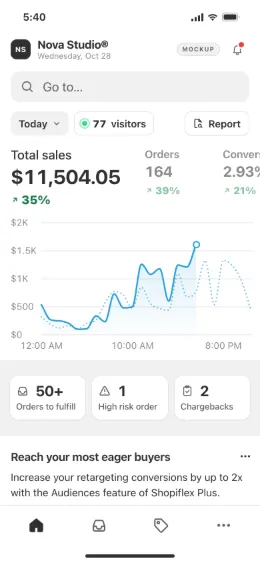
A fake sales dashboard is a sales screen filled with numbers you chose: a total, orders, products and a curve through the day. Shopiflex draws one for a store, with orders landing live under your store name, and Flextripe draws one for a SaaS or a club. Both are free to try, then $29 a month.
Opens in your browser, no account. Full version $29 a month, cancel anytime. What the full version adds
Not affiliated with Shopify or Stripe. Original design, no Shopify or Stripe logo or trademark.
Part of the fake dashboard generator hub.
What a fake sales dashboard is for
A fake sales dashboard is a screen of sales numbers you chose, shown for a reason that has nothing to do with a real business: a skit, a trailer for a product, a pitch deck for something with no customers yet, a film set. The numbers are the point, and they should move, because a frozen total looks pasted in. Larpea has two apps that draw one, depending on what is being sold.
Fake sales dashboard: pick the app by the scene
| The scene | Use | What moves on screen |
|---|---|---|
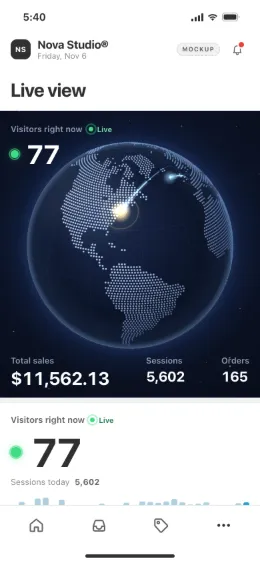
| A store launch | Shopiflex | Orders, visitors, carts, top products, stock going down. |
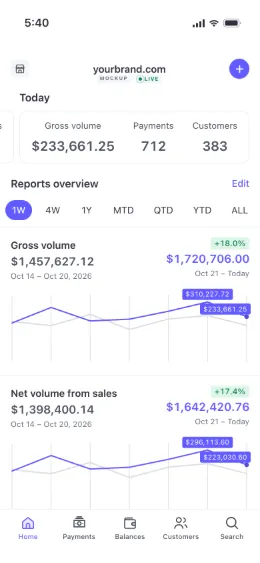
| A SaaS or an online product | Flextripe | Volume, payments, customers, ranges from a week to all time. |
| A paid community or a club | Flextripe, Memberships tab | Members, recurring revenue, churn, joins and renewals. |
| A deal pipeline, a CRM or a rep leaderboard | Neither app | Not drawn: both show sales as money in, not deals in progress. |
The screens you would film
Build the scene in five steps
- Choose the business. A store, a SaaS or a paid community. The choice decides which app and which screen you film.
- Name it. A business name and a logo of your own. Nothing else is branded.
- Enter the numbers you want to see. Targets for the day or the period: the curves, orders and customers are drawn from them.
- Pick the range and the layout. A laptop layout for a screen recording, a phone layout for a vertical video.
- Go live and film in one take. Live mode keeps orders or payments landing; a fixed seed lets you retake with the same numbers.
Both apps are free to try with no account, then $29 a month each for the full version, cancel anytime.
What you control, what is drawn
| You set | The app draws |
|---|---|
| Business or store name, logo, theme | The whole screen under that name, with no other brand. |
| Products and prices | Top products, units sold, stock going down. |
| Targets for sales, sessions or volume | Curves, order and payment lists, averages and conversion. |
| A seed, kept or changed | The same dashboard on every retake, or a fresh draw aimed at the same totals. |
Fake sales dashboard Shopify style
For a store, Shopiflex draws the screen people mean by a fake Shopify sales dashboard: sales today, orders, sessions, conversion and a live view of visitors, in our own design. The longer version is on the fake Shopify dashboard page.
Fake SaaS dashboard, fake business dashboard, fake company dashboard
For a software product or any company that sells online, Flextripe draws volume, payments and customers under the name you type, and the fake Stripe dashboard page goes through the ranges. A fake company dashboard is the same thing with a different name on top: the business name and logo are the only brand on the screen.
Fake sales report and dummy sales dashboard
Neither app exports a report. There is no PDF, no CSV and no invoice, on purpose: the only file is your settings as JSON. If you need rows of dummy sales data to feed a dashboard you are designing yourself, start from mock data for dashboards. If you need an app screen for an ad or a demo video, see app mockups for ads and demo videos.
What it is never for
These dashboards show simulated sales. Presenting them as real results to sell a course, a store or an investment is a deceptive earnings claim, and our terms forbid it. For what to ask when someone shows you one, read spotting faked sales results; for the law, is larping illegal in the US.
More from the same hub: a Shopify live view for videos, the Whop dashboard mockup and the full fake dashboard generator list.
Ready to film the sales? Start with Shopiflex for a store, or Flextripe for payments; both open in your browser.
Try Shopiflex free, no cardOpens in your browser, no account. Full version $29 a month, cancel anytime. What the full version adds