
Larp Apple Pay: a larp card tap to pay, on camera
Updated · By Larpea
A larp Apple Pay is a tap to pay you film for a video: the phone raised, a face scan, a check mark, a larp card that looks expensive. My Larp Cards plays it on your own phone with original card designs and no Apple marks, free to try, then $14 a month. Nothing is charged.
Opens in your browser, no account. Full version $29 a month, cancel anytime. What the full version adds
Not affiliated with Apple or Apple Pay. Original design, no Apple logo or trademark.
Part of the fake dashboard generator hub.
What a larp Apple Pay, or Apple Pay larp, is
“Larp Apple Pay” is the TikTok name for one short shot: a phone raised to pay, a face scan, a check mark, and a card that looks expensive. People want the gesture and the screen, not a payment. My Larp Cards gives you both without Apple's marks: a wallet of original metal, glass and holographic cards on your phone and a tap-to-pay animation you trigger yourself.
It runs in your browser. It is not added to Apple Wallet, it does not use Apple Pay or any payment network, and no card-network logo appears on its designs. That is what makes it filmable anywhere: there is nothing behind it to charge.
The cards and the tap
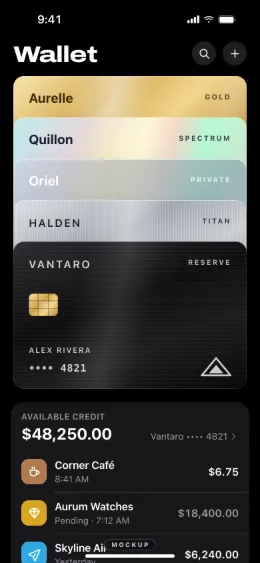
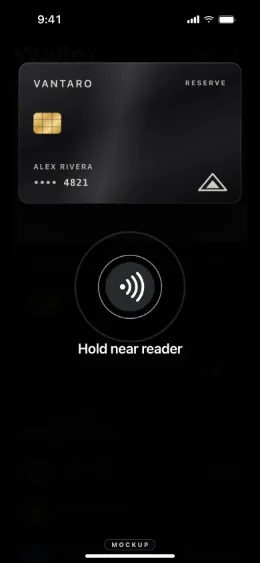
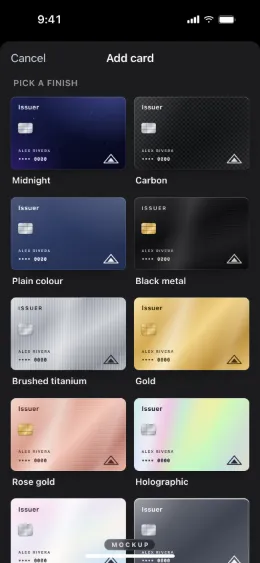
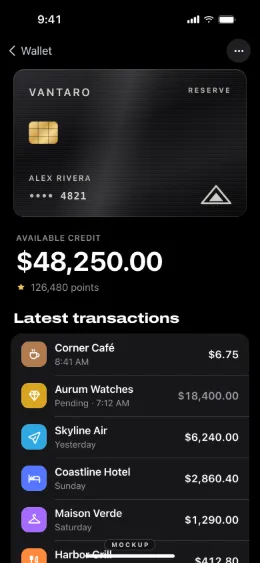
Film the tap in six steps
- Design the card. Pick a finish (Midnight, Carbon, Plain colour, Script green and Graphite are free; the full version has 22), type an issuer name of your own and the last four digits. They are labels, not a card number.
- Add the spending. Merchants, amounts and dates under the card, so the screen after the tap looks lived in.
- Open phone mode. On the phone you will film, in Safari, or from the home screen with the full version, full screen without a browser bar.
- Bring the card forward. Tap a card to bring it to the front of the stack, tap again to open it.
- Double-tap the right edge to pay. The phone plays a face scan, a “hold near reader” and a check mark. No terminal is contacted and nothing is charged.
- Film it close to a counter, not a terminal. Hold the phone near a prop or your hand, never against a real payment terminal at a real shop: the scene is the screen, not a purchase.
The free version has up to 2 cards and 5 finishes with the mockup label on. The full version, $29, unlocks unlimited cards, all 22 finishes, the label on or off and the home-screen app. For the whole wallet screen rather than the tap, see the fake Apple Wallet page.
Larp Apple Wallet and the Apple Pay prank
People also search for “larp Apple Wallet”: the card stack itself, drawn in original designs on your own phone, with nothing added to the real Apple Wallet. An “Apple Pay prank” is a bit you film with a friend who knows it is a joke: the raised phone, the check mark, the reaction. Say on screen that it is a mockup, and never use it at a real terminal. For the cards themselves, their 22 finishes and the wallet stack, see the larp card page.
The line it does not cross
A tap to pay on camera is a prop. A screenshot of it sent to someone as proof that you paid them is a fake payment proof, and that is fraud in most countries: no app from Larpea produces receipts, payment confirmations or card numbers, and our terms forbid presenting any screen as one. If someone sends you a payment screenshot as proof, check your own account instead; how to spot a fake payment screenshot explains how.
Other scenes from the same hub: the fake notification maker and the fake camera recording screen.
Ready to film the tap? My Larp Cards opens in your browser; design a card, then double-tap the edge to pay.
Try My Larp Cards free, no cardOpens in your browser, no account. Full version $29 a month, cancel anytime. What the full version adds