
How to make a skit with your phone: 8 steps
Updated · By Larpea
To film a skit with a phone screen, write three beats, make one screen the prop, film a wide shot, an insert of the screen and a reaction, then cut and label. The steps below, part of how to make a larp video, use a camera, a lock screen and a creator dashboard mockup.
Why a phone-screen skit works
A screen skit works because the audience understands the object at once: everyone knows what a camera viewfinder, a lock screen or a creator dashboard looks like, so the joke can start in the first second. It is also easy to film. The whole production is one phone as the prop, one phone as the camera, and one person who can do a double-take. It belongs to the same pipeline as how to make a larp video; this page covers the part about the screen.
The skit in eight steps
- Write the skit in three beats. Setup, turn, label. For example: you answer a call with a beach behind you, the beach turns out to be a clip, you admit you are in the hallway. Twenty-five seconds is enough.
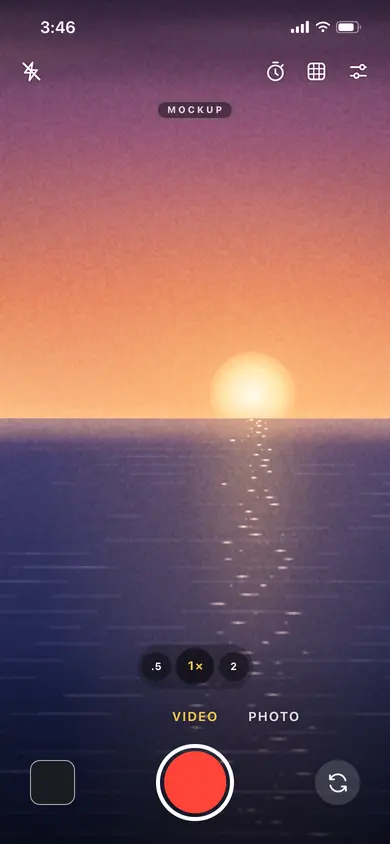
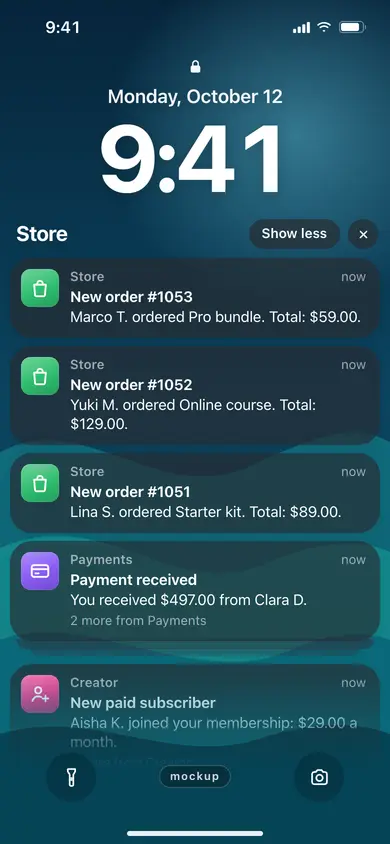
- Decide which screen is the prop. One screen carries the joke. In Larpcam it is the viewfinder playing a clip; in a sales-notification skit it is the lock screen; in LarpTok it is the climbing post counter. Load or script it before you film.
- Set up two devices, or one and a mirror. Use phone A as the prop and phone B as the camera. If you only have one phone, film the prop screen in a mirror or put it on a stand and film yourself with a webcam. Do not hold the prop and the camera in the same hand.
- Fix the brightness and the angle. Set the prop screen to about 80 percent brightness and tilt it about 15 degrees away from any window so there is no glare. Turn off auto-lock for the length of the shoot.
- Shoot the wide shot first. Film yourself with the prop in frame, 1080 by 1920 at 30 fps, shutter near 1/60 s. Say the whole skit once so you know the timing; do not worry about the screen yet.
- Shoot the insert of the screen. Move the camera close until the prop screen fills most of the frame. For flicker or lines, use the fixes in prop phone screens for film; they apply to phones as well as laptops.
- Shoot the reaction. Film your face reacting to the screen: the double-take, the sigh, the stare. These shots are what makes a screen skit funny; the screen itself is only the setup.
- Cut, label and post. Cut wide, insert, reaction, wide. Put the label on screen from the first second, for example "Skit. The beach is a clip." Then post with the first line of the caption saying the same. See mockup label wordings for more.
A sample shot plan, 27 seconds
| Shot | Seconds | What the camera sees | App |
|---|---|---|---|
| 1. Wide | 0 to 6 | You hold the prop phone, a quiet beach clip plays in the viewfinder | Larpcam |
| 2. Insert | 6 to 12 | Close on the viewfinder: the shutter, the timer, the zoom | Larpcam |
| 3. Reaction | 12 to 18 | You glance at the camera and wince | none |
| 4. Insert | 18 to 23 | The lock screen buzzes with three order banners | My Larp Notifs |
| 5. Wide | 23 to 27 | You put the phone down: label on screen | LarpTok (optional counter) |
What the screens look like
These are the three screens used in the plan above. They are Larpea mockups, marked as such, and every number on them is one you set.

Three problems you will meet
- Glare on the prop screen. A window or a lamp behind the camera shows up as a bright patch. Move the prop a little, tilt it down, or turn the room light off and use one lamp from the side.
- The prop screen looks dim on camera. A phone screen on camera usually needs more brightness than it does to your eye. Raise it, and lower it again if the highlights turn white.
- The skit is too slow. If the setup takes more than six seconds, cut it. The viewer is waiting for the turn, so cut the second wide shot first.
Keeping it a skit
A skit stays a skit when the audience is in on it. Put the label in frame, keep any claim out of the caption, and do not use a camera mockup to present a clip as footage of a real place or moment to someone who would act on it: how to tell if a private jet photo is real shows what viewers check, and how to label AI photos covers the labelling rules for generated images.