
Fake live stream simulator, with a free chat tool
Updated · By Larpea
A fake live stream simulator puts a crowd on your screen that is not there: chat scrolling, comments, counters. Larpea has a free chat tool that runs in your browser today, and LarpTok's live mode for counters and your own comments. My Larp Live, a full live screen, is planned and not on sale yet.
Not affiliated with Twitch, YouTube or TikTok. Original design, no real platform's logo or trademark, no emotes.
Part of the fake dashboard generator hub.
What a fake live stream simulator actually is
The search covers three different products, and mixing them up wastes an evening. The first is a chat: a column of usernames and messages that keeps scrolling, which is what a skit about going viral needs behind the host. The second is a whole live screen on a phone, with a viewer count and hearts floating up. The third is an app that listens to your voice and answers with generated viewers.
Larpea has the first today, free, in your browser. The second, My Larp Live, is planned and not on sale: its page says so and takes an e-mail address, nothing more. We will not describe it as working before it does.
Fake live stream simulator free: the chat you can use now
The stream chat simulator is a free fake live stream chat simulator. It writes the chat as it scrolls: invented names built from a list of thirty adjectives and thirty nouns, written lines in three moods, and a speed from one message every four seconds to about ten a second. You can mix in your own lines, send a message as yourself, and turn the background green so an editor can remove it. There is no sign-up and no video is recorded; you record your screen.
It joins no channel and reads no real chat, so it cannot show a real streamer's viewers or a real person's name. That is the point: a chat for a sketch has to be nobody's.
Fake live stream comments for the shot
Comments are the part viewers read, so they carry the scene. Write them as people would type them: short, lowercase, a little off topic. A few questions, some replies that start with a name and one running joke give a chat its texture. LarpTok has a box for exactly this: its live mode plays the comments you write, one per line, while the counters tick. It is a creator-analytics screen, so use it for the profile shot and the chat tool for the chat shot.
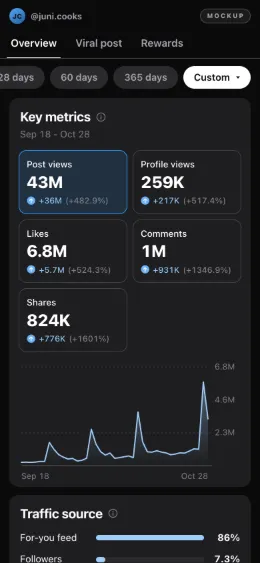
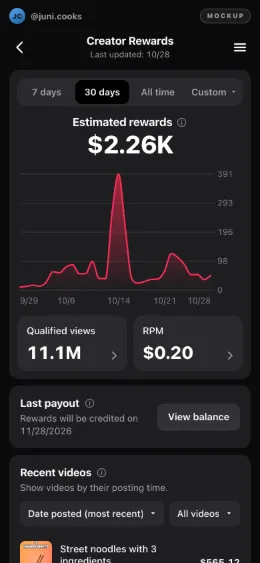
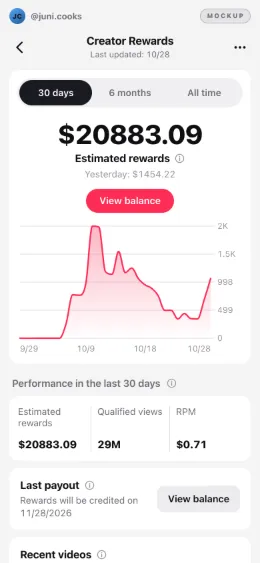
Film a fake live stream in six steps
- Frame the shot first. Decide whether the scene is a vertical phone shot or a horizontal desktop one. A fake live stream reads best when the chat sits on one side of the frame and your face on the other.
- Open the free chat in its own window. Use the stream chat simulator. Set the speed to 4 or 5 for a busy channel, or 2 for a quiet one, and pick a mood: hype for a big moment, chill for a late-night talk.
- Add the lines your scene needs. Type your own lines in the box, one per line, for the jokes and the in-world reactions, and raise their share to 40 or 50 percent. The seed keeps the rest of the chat identical from one take to the next.
- Pick the background. Dark is for screen recording. Green screen is for editing: key the green out in your editor and the chat floats over your footage.
- Record in one pass. Start the chat, press the burst button on the beat that needs a surge, and let your screen recorder or a second camera run. The chat banner stays in the frame by design.
- Label the clip. Say in the caption that it is a skit. The mockup labels page has wording that fits every platform.
Fake YouTube live stream simulator, fake Twitch chat, fake TikTok live
People add a platform name because they want that platform's look. We copy none of them: no logos, emotes, badges or layout. A chat in our own colours, labelled as simulated, is enough for a skit, and it keeps your video clear of a platform's brand rules. For a comment under a video, the fake YouTube comment generator draws a card with an invented name. If you need the specific scenes, a fake Twitch donation alert and a fake TikTok live each have their own page.
The fake live stream tools side by side
The rows for other apps come from our directory of larp tools, with the date we read each listing. One copies the live interface of a social app, which is the look we avoid.
| Option | Platform | Price as listed | What it does, as described | Checked |
|---|---|---|---|---|
| Larpea stream chat simulator | Any browser | Free, no account | A scrolling chat with invented names, speed 1 to 10, your own lines, green screen. It makes no video. | 1 November 2026 |
| LarpTok live mode | Any browser | Free to try, then $19.00 | Counters that keep climbing and comments you write, full screen. It is an analytics screen, not a camera view. | 1 November 2026 |
| My Larp Live | Planned, web | Not on sale yet | A live-stream screen around your own camera. Not available: no date, nothing to buy. | 1 November 2026 |
| Fake Live Stream – Famos | iPhone | $6.99 a week, $29.99 a year, $99.99 lifetime. | A fake live stream with an AI audience that reacts to your voice. By Penendi LLC. | 18 October 2026 |
| Fake Live Stream: HoloFame | iPhone | In-app purchases. | A fake live with fake fans. | 11 October 2026 |
| Fake Live Stream: Famousfy | iPhone | In-app purchases. | Live-stream practice with AI fans. | 11 October 2026 |
| PocketFans – Live Simulator | iPhone | $29.99 to $39.99. | A copy of a TikTok live at "100,000 viewers", with gifts. Copies TikTok's live interface. | 11 October 2026 |
The full list, with the risks we noted for each, is in fake live stream apps compared.
Where the skit ends
A simulated crowd on your own screen is a prop. A crowd you try to send to someone's real stream is not, and nothing here does that: no viewer, view or follower leaves this page. Showing a simulated audience to a sponsor as your real reach misleads them, and in the US the FTC's rule on reviews and testimonials (16 CFR Part 465) also covers fake indicators of social media influence. Keep it to skits and film sets. Related scenes: a fake TikTok follower count and a fake YouTube earnings dashboard, from the same fake dashboard generator hub.